
Main scenario
Old games ask for specific DLL files or do not launch after installation.
Legacy Runtime is a package of old DirectX SDK components for games and programs that lack D3DX, XInput, XAudio, XACT, or D3DCompiler. It is needed not instead of DirectX 12, but alongside it.
directx_Jun2010_redist.exeOffline runtime, 95.6 MB
SHA-256 is listed belowVerification hash: 053f76dc…bf89c73b
Without manual DLL replacementFirst run the runtime installer, then restart the game
About the version
DirectX Legacy Runtime is a practical answer to old game errors. It adds libraries that were once installed together with DirectX SDK and are still required by many games: D3DX9, XInput 1.3, XAudio 2.7, XACT, and D3DCompiler.
The package does not downgrade or replace the system DirectX. On Windows 10/11 you can keep DirectX 12, and legacy components will simply be available to the games that need them.
Old games ask for specific DLL files or do not launch after installation.
D3DX, XInput 1.3, XAudio 2.7, XACT, and D3DCompiler components.
The package can be saved and installed without re-downloading components.
Install the full runtime instead of copying individual DLL files to system folders.
DirectX versions
If the current page does not match your game or Windows, choose a neighboring runtime package. The cards link to individual version pages.
The DirectX package list scrolls horizontally. Use the buttons or arrow keys.
For modern games, Windows 10/11, and current graphics cards.
File:directx-12-runtime.exe
DownloadFor games from the Windows 7/8/10 era and projects that need a DX11 renderer.
File:directx-11-runtime.exe
DownloadFor old games and systems requiring DX10 compatibility.
File:directx-10-runtime.exe
DownloadFor classic games, D3DX9 components, and old game engines.
File:directx_Jun2010_redist.exe
DownloadFull package of legacy DirectX SDK components for old games.
File:directx_Jun2010_redist.exe
DownloadFiles
The main button downloads the recommended file for this page. An alternative package is available nearby if a different installation scenario is needed.
| File | When to choose | Size | SHA-256 | Download |
|---|---|---|---|---|
| directx_Jun2010_redist.exeOffline runtime | Recommended option for this page | 95.6 MB |
053f76dc…bf89c73b
|
Download |
| dxwebsetup.exeWeb installer | Web installer for quickly installing missing components | 288.4 KB |
2cf71d09…26fd612f
|
Download |
Verified
Before downloading, verify not only the file name but also the size, SHA-256, and installation scenario. This reduces the risk of confusing a runtime package with a single DLL or a third-party build.
The page and verification data have been reviewed for the current DirectX.biz site structure.
Offline runtime, size 95.6 MB, SHA-256:053f76dc…bf89c73b.
We compare the package, hash, runtime purpose, and installation scenario without manual system DLL replacement.
Microsoft: DirectX End-User Runtime Web Installer Microsoft: DirectX End-User Runtimes June 2010 Microsoft Support: checking DirectX version
Verification
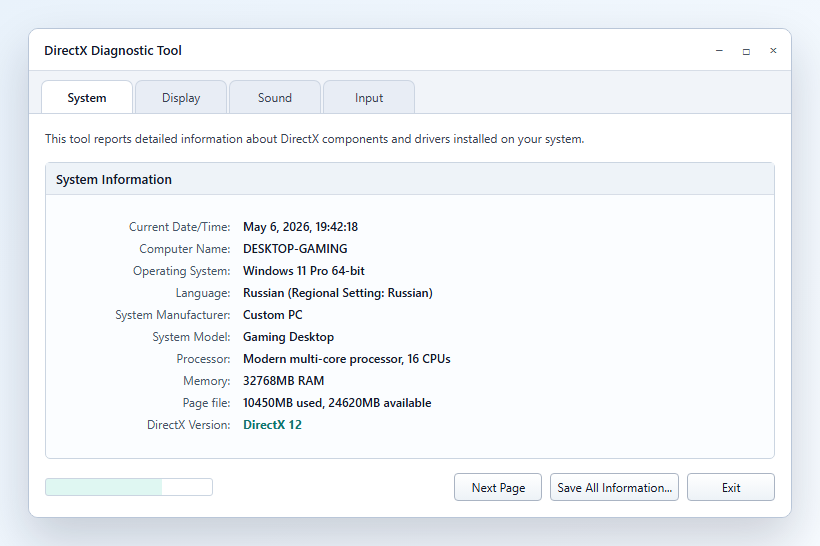
DXDiag shows the system DirectX version and graphics card capabilities. This helps determine whether a runtime package, GPU driver, or different DirectX version is needed.
Installation
Installation must be predictable: no random DLL files, no replacement of system folders, no extra steps after downloading.
Game errors
Usually resolved by installing DirectX End-User Runtime.
The package adds old XInput for games and gamepads.
The component is needed by old game engines for audio.
The runtime adds old compiler components required by games.
FAQ
No. It is installed alongside and adds old libraries for compatibility.
If you need to save the full package, install it on multiple PCs, or work without a stable internet connection.
A single DLL may not match the required version. The runtime installs a set of components more reliably.