DirectX 12
For modern games, Windows 10/11, and current graphics cards.
- Direct3D 12 and new graphics APIs
- Best choice for new games
- Compatible with modern video drivers
File:directx-12-runtime.exe
DownloadChoose DirectX for your Windows version and game: from the current DirectX 12 to legacy runtime for old projects.
After clickingA selection of suitable DirectX packages will open.
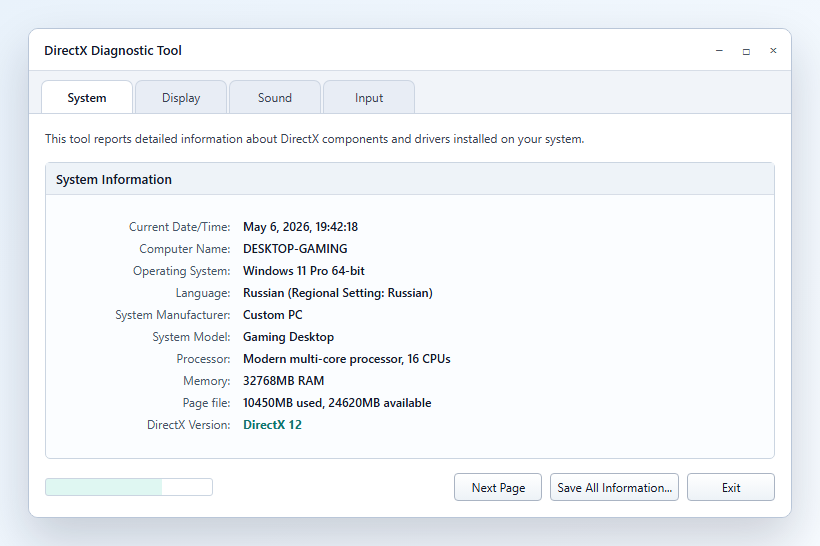
Not sure what is already installed?Check the version via dxdiagbefore downloading.
For gamers
DirectX works as a common language between the game, Windows, the graphics card, audio, and controllers. The game calls graphics, shaders, audio, and input via runtime components, and the system passes these commands to drivers.
If the required component is missing, the game may fail to start, show a d3dx9_43.dll, XInput1_3.dll, or Direct3D device error, or reset graphics settings. New games usually depend on Windows and the video driver, while old projects often require legacy runtime with DirectX 9-11 libraries.
DirectX versions
Different games require different DirectX components. Start with the version for your Windows, then check the game requirements.
The DirectX package list scrolls horizontally. Use the buttons or arrow keys.
For modern games, Windows 10/11, and current graphics cards.
File:directx-12-runtime.exe
DownloadFor games from the Windows 7/8/10 era and projects that need a DX11 renderer.
File:directx-11-runtime.exe
DownloadFor old games and systems requiring DX10 compatibility.
File:directx-10-runtime.exe
DownloadFor classic games, D3DX9 components, and old game engines.
File:directx_Jun2010_redist.exe
DownloadFull package of legacy DirectX SDK components for old games.
File:directx_Jun2010_redist.exe
DownloadDLL files
If the game asks for a specific DLL, legacy runtime is usually needed. The installer adds the required DirectX components without manually replacing system files.
On a small screen, DirectX table rows are displayed as cards with the file, reason, package size, SHA-256, and a download button.
| File | When it appears | Solution | Guide | Package size | SHA-256 | Download |
|---|---|---|---|---|---|---|
| d3dx9_43.dll | Old games on DirectX 9 | Legacy Runtime | Guide | 95.6 MB |
053f76dc…89c73b
|
Download |
| XInput1_3.dll | Gamepads, old launchers | Legacy Runtime / XInput | Guide | 95.6 MB |
053f76dc…89c73b
|
Download |
| X3DAudio1_7.dll | Sound and 3D audio in games | DirectX End-User Runtime | Guide | 95.6 MB |
053f76dc…89c73b
|
Download |
| D3DCompiler_43.dll | Shaders and old engines | DirectX runtime package | Guide | 95.6 MB |
053f76dc…89c73b
|
Download |
Verified
Before downloading, it is important to verify the file name, package size, SHA-256, and runtime purpose. This helps distinguish the correct installer from a random DLL or third-party build.
Page reviewed for the DirectX.biz structure, version pages, and individual error guides.
File pages list the package size and SHA-256 for verification before running the installer.
First, a runtime package is selected for the error scenario, then the file, hash, and absence of manual DLL replacement are verified.
DirectX End-User Runtime Web Installer DirectX End-User Runtimes June 2010 Microsoft Support: DXDiag
DxDiag
Windows includes DirectX Diagnostic Tool. It shows the current DirectX version and helps gather video and audio information for diagnostics.
Installation
Download the suitable DirectX package, check the file name, and install the runtime without manually replacing system libraries.
Game errors
A common sign of missing legacy DirectX SDK components. Start with the legacy runtime.
The error occurs in old games and launchers. The Microsoft installer can add the required side-by-side component.
The cause may not be the installer, but the graphics card, driver, or Windows version. Check dxdiag.
This can happen due to a conflict between the DirectX version, graphics card driver, or render mode. Start with dxdiag and updating the runtime.
Check DirectX, the video driver, and fullscreen mode. For old games, legacy runtime and running as administrator sometimes help.
FAQ
Usually no. On Windows 10 and 11, the current DirectX is already installed, and updates arrive via Windows Update.
It is needed by some old games that use legacy components like D3DX9, XAudio 2.7, XInput 1.3, or XACT.
Yes. The site has separate download pages for DirectX 12, DirectX 11, DirectX 10, and legacy runtime.
Usually the legacy runtime is needed. It adds old DirectX components that are not replaced by regular DirectX 12.
In most cases, no. DirectX 12 is designed for Windows 10/11; for Windows 7, DirectX 11 or legacy runtime is more common.
The cause may be in the graphics card driver, Windows version, corrupted game files, or that the game needs a different runtime package.
No. DirectX components are installed alongside system libraries, and Windows itself uses the required set for each specific game.